How to use the Food Wheel
The Food Wheel ends the what-should-we-eat debate in one spin. Here's how to pick a list, add your own favourites and use the result.
Quick start
- Pick a list: All Foods, Dinner, Lunch, Takeout, Healthy or Fast Food.
- Change it if you like: add foods, remove the ones you don't fancy, or paste your own list.
- Spin. The food is chosen at random before the wheel moves, then the wheel lands on it.
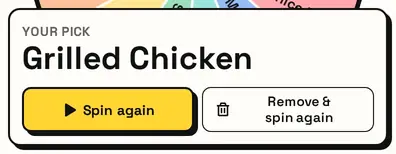
- Not feeling it? Press Remove & spin again to take it off and decide again.
Pick a list
Six lists sit above the wheel: All Foods, Dinner, Lunch, Takeout, Healthy and Fast Food. Each one loads a ready-made set of dishes, so you can match the wheel to the meal.


Add your own dishes
Type any dish into the box under the list, a family favourite or what's actually in the fridge, and it gets its own slice. The list is saved on this device.

Switching lists asks first, so your additions are never replaced by accident. Reset brings back the list you picked.
Decide and go
The card shows what to eat. Not feeling it? Remove & spin again takes it off and picks again, so you never land on the same thing twice.
Great for
- Deciding what's for dinner tonight
- Picking a lunch spot with coworkers
- Choosing a takeout cuisine for the group
- Family meal planning when nobody can choose
- Date-night dinner ideas
- Settling the 'I don't mind, you pick' debate
Customize everything else
This page uses the same wheel as the homepage, so all the usual options work here too. The full wheel guide explains each one with pictures:
FAQ
How does the Food Wheel decide what I eat?
It picks one food from the wheel at random, with every option equally likely, and the wheel lands on it.
Can I add my own foods or restaurants?
Yes. Type them in, paste a list, or remove anything you don't want.
What's the difference between the lists?
They're different starting points: All Foods, Dinner, Lunch, Takeout, Healthy and Fast Food. You can edit any of them.
Can I remove a food after it comes up?
Yes. Press Remove & spin again to take it off the wheel and spin for something else.
Does the Healthy list give nutrition advice?
No. It's just a lighter set of food ideas, not dietary guidance.