How to use the Random Country Generator
The Random Country Generator picks countries with their flags and regions. Here's how to filter them and send them to the Country Wheel.
Quick start
- Choose how many countries and a region, or all countries.
- Exclude any countries you don't want.
- Press Generate for an instant list with flags.
- Copy the names, or press Spin these countries to put them on the Country Wheel.
Choose your settings
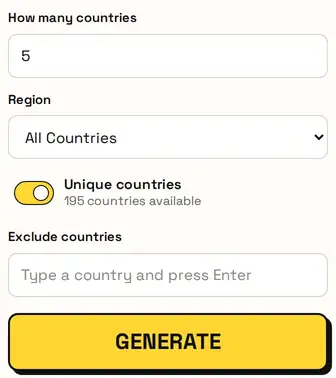
Set how many countries and choose a region, or All Countries. Unique countries stops repeats, and Exclude countries leaves out any you name: type a country and press Enter.
Your countries
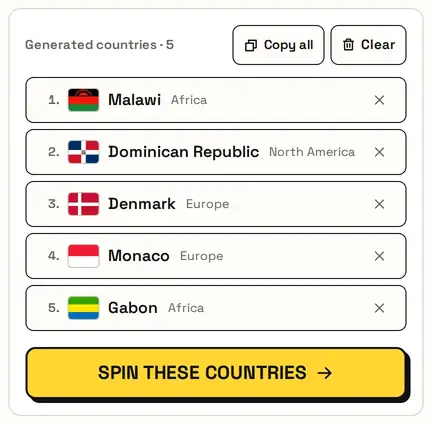
Each result shows the flag, the country and its region. Remove one with ×, Copy all for a list, or Clear to start again.
Ways to use it
- Geography quiz: find each country on a map.
- Travel bucket list inspiration.
- Assign a country to each student for a project.
- Cooking challenge: a dish from each country.
Spin them on a wheel
Press Spin these countries and the Country Wheel opens with your countries already on it. If you'd already set up that wheel, it asks first before replacing anything.
Great for
- Geography lessons and quizzes
- Picking countries for a project
- Travel bucket-list ideas
- Themed food or culture nights
- Game and trivia rounds
- Pen-pal or research assignments
Private and fair
Everything runs in your browser, so your countries are never uploaded. Each pick uses your browser's secure random generator, so every option has a fair chance.
FAQ
Can I generate countries from one continent?
Yes. Choose the region before you generate.
Can I leave some countries out?
Yes. Add them under Exclude countries.
How many countries can I generate?
Up to 100, or as many as the region has when results are unique.
Can I spin the countries afterwards?
Yes. Spin these countries opens them on the Country Wheel.