How to use the Random Name Generator
The Random Name Generator creates a list of names in one click. Here's how to choose the kind of names, edit the list and send it to a wheel.
Quick start
- Choose how many names, the kind of names and first or full names.
- Press Generate for an instant list.
- Remove or edit any name you don't want.
- Copy the list, or press Spin these names to put them on the Name Wheel.
Choose your settings
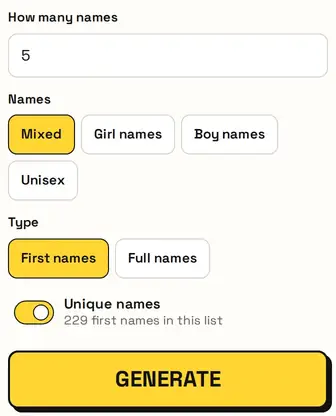
Set how many names, then pick Mixed, Girl names, Boy names or Unisex, and First names or Full names. Unique names stops any name appearing twice; the hint shows how many names the list has.
Your names
The results are numbered. Remove any name you don't like with ×, press Copy all to paste them anywhere, or Clear to start over.

Spin them on a wheel
Press Spin these names and the Name Wheel opens with your names already on it. If you'd already set up that wheel, it asks first before replacing anything.
Great for
- Character names for stories and games
- Placeholder names for designs and mock-ups
- Practice data for classroom exercises
- Team or player names for a game night
- Baby name brainstorming
- Seating plans and role-play activities
Private and fair
Everything runs in your browser, so your names are never uploaded. Each pick uses your browser's secure random generator, so every option has a fair chance.
FAQ
Can I generate full names?
Yes. Switch to Full names to pair each first name with a surname.
How do I get names with no repeats?
Keep Unique names switched on.
Can I spin the names I generated?
Yes. Press Spin these names and they open on the Name Wheel.
Are these real people?
No. They're random name combinations, not real identities.