How to use the Hair Color Wheel
The Hair Color Wheel paints every slice in its real shade, so you see exactly what you get. Here's how the lists and swatches work.
Quick start
- Start with Mixed, or choose Natural or Fantasy.
- Spin. Each slice is painted in its color, so you see the shade you get.
- Use it for a character sheet, a sketch or a game.
- Add your own shades or rename any of them.
Real swatches, natural or fantasy
Each slice is the actual hair color, from black and auburn to platinum blonde. Pick Natural for everyday shades, Fantasy for pinks, teals and neon, or Mixed for both. Labels switch between dark and light text so they stay readable on every shade.


Rename a shade
Click any color name in the list to edit it, for example to match the paint or brush names you use. Press Enter to save or Esc to cancel. New shades you type in get a slice too, in a standard wheel color.

Use the result
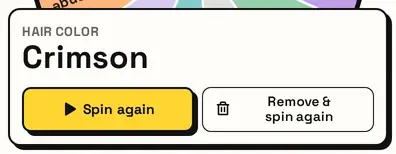
The result card names the shade. Pair it with the Eye Color Wheel and the Random Character Wheel to build a whole character in three spins.
Great for
- Character design and OCs
- Drawing and coloring practice
- Writing character descriptions
- Video game and avatar creation
- Role-play and tabletop characters
- Doll and figure customising
Customize everything else
This page uses the same wheel as the homepage, so all the usual options work here too. The full wheel guide explains each one with pictures:
FAQ
Can I see the actual color?
Yes. Each slice is painted in its hair color.
Are there unnatural colors?
Yes. Pick Fantasy for pinks, blues, purples and more.
Can I add my own shade?
Yes. Type it into the list or rename an existing one.
What is it for?
Character design, drawing, writing and games.